 Desklog
Features · Project handovers
A new home for the whole project
Move work between Desks you own with its discussion, files and history intact. Preview the handover and its access changes before confirming.
From studio work to a client workspace
A project may start in your own Desk and later need a dedicated home. Moving it should not mean rebuilding tasks or copying a conversation by hand. Desklog supports moving organizations, projects, tasks and wiki pages between Desks when you own both workspaces.
Move the project, not just its title
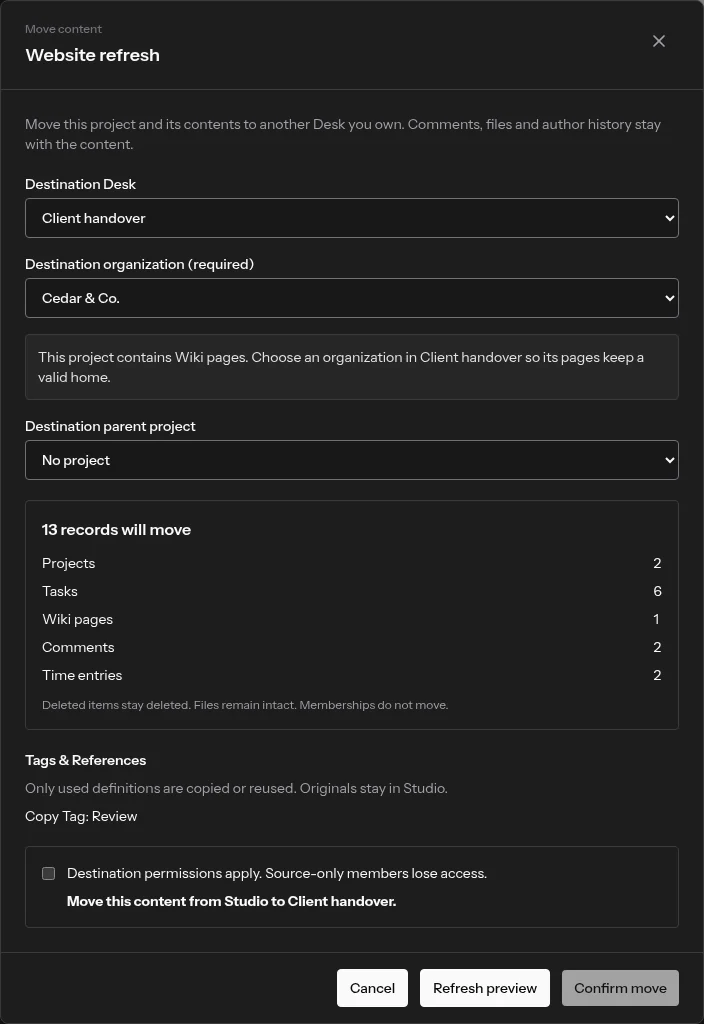
The preview brings together the included tasks, pages, comments, time entries and attachments. Archived and deleted content keeps its state, and files remain intact. Review the proposed destination before applying the move.
Keep context without overwriting the destination
Used tags and reference definitions are copied or reused; their source definitions remain. The preview shows affected identifiers and task keys. Existing destination content is not overwritten, so a familiar project name does not silently replace another project.
A move is also an access change
Membership does not travel with content. Destination permissions take over, and people who only belonged to the source Desk lose access to the moved work. An assignee who cannot read tasks in the destination may be removed. These consequences are part of the review, not hidden behind the move button.
Deliberate handovers, not accidental sharing
Ownership of both Desks is required; being an Admin alone is not enough. A project containing wiki pages needs a destination organization so its pages keep a valid home. Explore Desks and collaboration to understand how workspace boundaries and access profiles fit together.